Roadmap and Recent Launches
Learn about our recent launches and upcoming projects.
Planned in Q4
Survey Overhaul Continued
Support for "full" Engagement Surveys, rating distributions, manager perspective, and more.
Calibration Groups
In the new calibration View we'll support manager-led calibration, official groups and better tracking.
Cascading Objectives Refined
While the functionality is all there, a lot of smaller usability improvements will make usage a lot smoother.
AI Integration
Our AI Features are powerful already, next up we'll make them feel even more native inside the product, connecting features with another even better.
Q3 2026
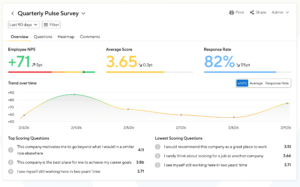
Surveys: eNPS Support
You can now extend your pulse survey with proper eNPS scoring.
Click to read more
360 Feedback Housekeeping
An AI-summary of 360 feedback, better read- and write-experience, and better notifications for Anytime Feedback.
AI Coaches for 1:1 Meetings
AI Coaches now available on 1:1 Meeting screens and on User Profile sidebars.
"Views" in Performance Reviews
Our new "View Presets" give admins smart defaults for tracking progress and for analyzing results.
Early Access
Connect to AI-Systems via MCP
Allowing admins to analyse and process SI data from your preferred AI tools.
Coming Up
New Survey Dashboard
New dashboard featuring highlights, improved reporting, and a built-in AI Coach.
Q2 2026
Outlier Detection
Let SI point out outliers and potential problem areas in reviews across your company.
Review Reporting & Charting
Report on rated questions, explore in-depth distribution charts, and filter anything.
Admin Navigation
A new navigation for admins that's more natural and gives access to core features faster.
Adjustable & Conversational AI
Fine-tune existing AI features to your needs, offer your staff an AI workspace, and ensure adoption by including your adjusted AI-Coaches right into features.
Talent Boxes
Plot your staff on a 9-box grid (or any grid really) based on your review's rated answers.
Q1 2026
Cross-Cycle Reporting
Compare rating averages, chase status across multiple cycles.
Review Cycle AI Insight
Discover themes, problems and training gaps across entire review cycles.
Relaunched AI Writing Assistant
Get insight and suggestions on how to write better self-assessments and reviews.
Target Dates in Key Results
A simple but powerful improvement to make Key Results sticky.
Calibration Improvements
Clearer user interface for calibration cycles.
Group Surveys by Performance
Are your top performers fed up? Find out with Pulse Surveys.
Product Change Log
We roll out small improvements and bug fixes several times a week, and the larger improvements and feature releases get a mention in the list below. If you want updates delivered to you every other month, check out and sign up for our product newsletter.
Category
Performance Reviews
“Views” on Review List Screen
The Review list is highly adjustable, but once you’ve adjusted all the controls (filters, grouping, charts, columns) to your needs, the next use-case may require you to readjust.
Our new “Views” now give admins smart defaults for tracking progress and for analyzing results: When selecting “Progress” the chart and table columns for tracking progress are selected. And when selecting “Results”, you’ll see the distribution chart of ratings by default, while the table columns swap to showing ratings as well. Any adjustment you make, for instance fine-tuning the chart or excluding some department, is stored to the selected view only.
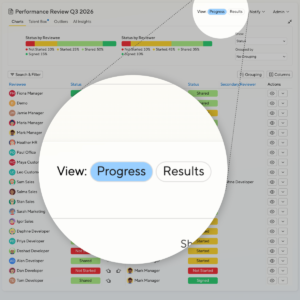
Next up we’ll include a Calibration view, and mid-term you’ll be able to create your own Views and share them with peer admins and managers.
AI Coach for 1:1 Meetings and User Profile
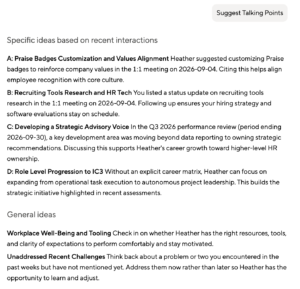
The user profile page and the 1:1 page now feature AI coaches of their own. As a user you can ask general questions, and common topics are suggested and just one click away. Need ideas for topics to discuss, or want a quick summary of a person’s performance over time? These are built in. And as always, admins can add their own suggested coaches via the settings screen.
Platform
Phasing out SMS-based 2-Factor Tokens
We’re gradually phasing out SMS tokens as 2-Factor-Authentication mechanism. As of today we’re actively encouraging users with 2FA enabled to register a TOTP mobile app instead (think Google Authenticator or Microsoft Authenticator). This process can still be skipped during the next couple of months, but in early 2027 the transition will become mandatory.
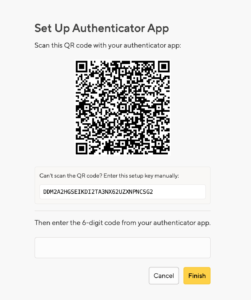
The background is that SMS tokens are generally a bit less secure than app-based tokens, and that users occasionally don’t receive their tokens due to delivery problems, which can cause temporary lockout.
360 Degree Feedback
Anytime Feedback
360 Feedback Housekeeping
The user interface for giving and reading 360/Anytime feedback received a makeover.
Both components had gotten a bit overloaded over the years, but now we streamlined the “edit feedback screen”, and the “view 360 screen” starts with an AI summary rather than the original question. The details have been moved to a dedicated tab: still accessible but not overwhelming anymore.
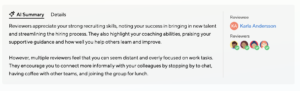
A couple overdue improvements were added to Anytime feedback specifically, including the ability to remind reviewers, remove slacking reviewers, and general design.
Surveys
eNPS in Pulse Surveys
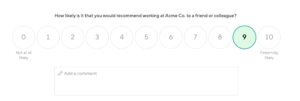
You’ve been asking for it, and it’s here: Pulse Surveys now supports eNPS (Employee Net Promoter Score). Admins can add an eNPS question to any survey using its own independent scale, working seamlessly alongside your existing questions. It’s one of the most widely used ways to measure employee loyalty and satisfaction, and now it’s built right into Pulse, with zero extra effort on your end.
Also, the survey questions now support rich text formatting, and we’ve applied a handful of other tweaks throughout the survey creation flow to reduce clutter and improve the overall experience.
Performance Reviews
Visualize your talent with Talent Boxes (9-Grid and more)
We’re rolling out a new Talent Box view to the Performance Reviews module.
Alongside existing charts and graphs, it maps employees across two axes like potential and performance, or any two numeric measures from your reviews. This can help you detect outliers and inconsistencies in how mangers assess people, and highlights staff who otherwise slipped under the radar (for better or worse).
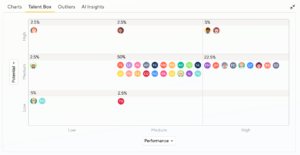
By selecting questions with more than 3 possible answers, you’re able to build more complex diagrams (3×4, 5×5, etc). Below, we mapped the overall rating versus the Keeper Test: Who are the employees with good ratings whom managers wouldn’t want to keep regardless, and who are the employees that should be kept despite having low ratings at the moment?
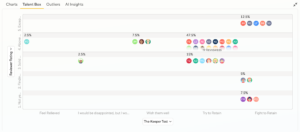
As with all other charts, admins can view the entire company, and managers can view their direct and indirect reports.
You can use filtering in the table below to drill into any combination of department, tenure, or gender you want. Filtering also works the other way around: Just click on a cell to display those people in the table below.
Or click on any of the employees to view their Performance Review directly.
AI
Performance Reviews
Platform
Adjustable and Conversational AI
We’re now offering the ability to upload your company background info like policies, company values, career matrix and more, so that our new AI Coaches can take these into account. Starting with the Review screens and a general workspace, you can either use our prebuilt Coaches, or copy and fine-tune them any way you like down to the very prompt.
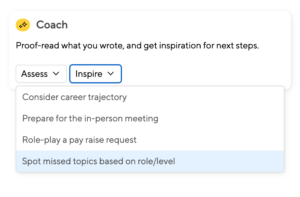
Learn more on the feature page or watch the video below:
Performance Reviews
Outlier Detection across all Rated Fields
The Review Outlier Detection, introduced in May, originally looked only at outliers in the overall rating. We’ve now extended it to take into account all reviewers’ answers to numerical questions too. This way it can help customers not using the overall rating, and customers who combine the overall rating with additional questions.
So if you’re using questions around potential, promotions, performance, or for instance a Keeper Test, this is for you!
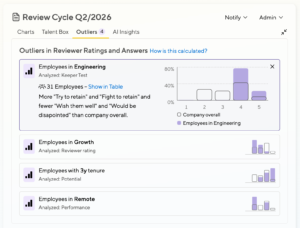
Learn more in our documentation, or watch the video below to get a brief overview:
1:1 Meetings
Housekeeping: User Settings, 1:1 Visuals, Adjustable Sidebar
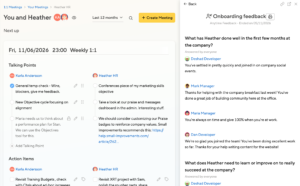
In between larger feature work we love to clean up the house a bit. This time around, we polished the user-settings screen, streamlined the 1:1 page, and the resources-sidebar now displays content inline rather than overlaying the screen you’re on. New drag-handles allow you to resize the sidebar to your needs.
Platform
Admin Navigation
We’ve simplified how you navigate Small Improvements.
- The Employee/Admin toggle is gone. Too many admins kept stumbling over it.
- Admin-level content like review cycles, templates, and company-wide settings now live directly inside each module (for example, head to Reviews → Company to manage cycles and templates).
- Global configuration such as Automations, Integrations, Insights, and Directory have been consolidated under Settings and People, so everything has a logical, predictable home.
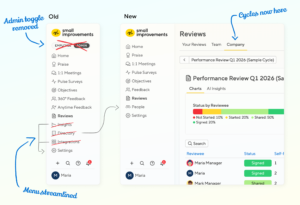
While at it, we’ve moved some admin section fields between screens, making them easier to find.
Performance Reviews
Review Outlier Detection
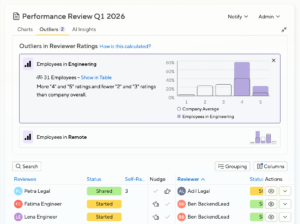
When you’re managing hundreds of performance reviews, hidden bias can slip through unnoticed. Our new Outlier Detection feature automatically surfaces statistically significant rating patterns across groups — by location, tenure, gender, team, manager, and more — so you can spot fairness issues in seconds. Instead of manually combing through spreadsheets, you’ll see exactly where ratings deviate from the cycle average and why it matters, backed by data science best practices.
Performance Reviews
Review Cycle Charting
Over the past months we’ve gradually improved the charting capabilities above the Performance Review table, allowing you to get insight and share charts without having to resort to external tools.
What’s new:
Flexible metrics Choose what you want to display: Review Status, Overall Rating, or any scored review question (such as a sliding scale or multiple choice).
Grouping and sub-grouping Break down results by Department, Location, Gender, and other key attributes to compare performance across your organization. You can also layer a second grouping on top, such as comparing gender distribution within each department.
Averages and score distribution For numerical values like ratings, toggle between viewing the average score per group or a full distribution, showing how scores are spread across the range rather than collapsed into a single number.
Linked chart and table filtering Charts update automatically when you apply table filters, so your visuals always reflect exactly the data you’re looking at. You can also click directly on a chart to filter the table below, making it easy to drill into specific groups.
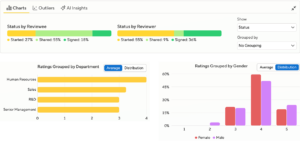
The new chart view is compact by default and can be minimized entirely, so your review table always remains close at hand.
Surveys
Pulse Surveys: Are your top performers quitting?
Our Pulse Survey feature is now undergoing a total overhaul, and we’re approaching it incrementally. In this first step, we’ve fixed several smaller bugs and UI glitches, and have added an important new grouping option: Group by Performance Rating. This can then be used to spot unhappiness on the Heatmap and on the timeline charts:
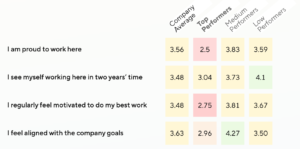
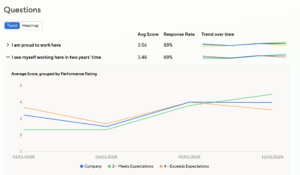
For those who don’t use overall ratings, you can also group by the Rated Questions in your reviews. So if you’re employing the Keeper Test for instance, this is now also an option.
Available to all customers on Grow and Elevate plans, and on legacy plans Gold, Unified and Suite.
1:1 Meetings
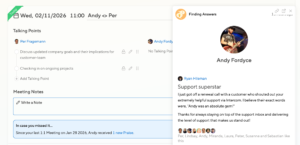
1:1 Improvement: “In case you missed it”
Small Win: In case your 1:1 partner was praised or received feedback since your most recent 1:1, we now show a little reminder underneath.
Performance Reviews
Streamlined Calibration Cycles
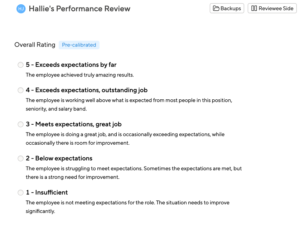
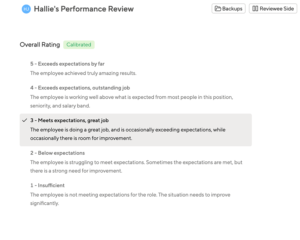
The review forms in calibration cycles have caused questions: Displaying both pre-calibrated and calibrated ratings at the same was requested by some customers but disliked by others. We’re now by default only showing the “current” one, and have cleaned up the admin screens a fair bit too. Learn about the updated process in our Help Center.
Performance Reviews
Question-by-Question Analysis
Sometimes overall ratings don’t paint the full picture, and review forms can benefit from “rated questions” like the Keeper Test, or a Promotion Recommendaiton. We’re evolving our reporting screens, and you can now use these questions to filter and group for more granular insight – also in combination with ratings or departments for instance.
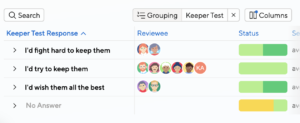
You add these columns via the “Columns” menu, selecting “Manage” at the end:
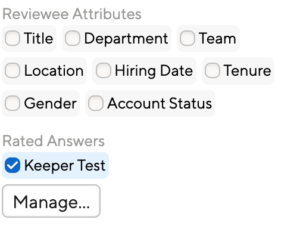
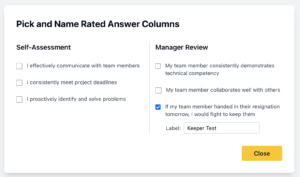
You can then select which questions from a review will be included, and you can give them a short name too:
AI
Performance Reviews
New Review Cycle AI Insights
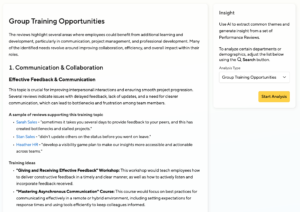
In addition to the recently launched Summaries, you can now check for Inappropriate Language, Gender Imbalances and get practical advice for Group Trainings.
Goals and Objectives
Target Dates in Key Results
We added an easy but powerful improvement to encourage clarity in Key Results. Target Dates help the author focus on what is truly achievable in a timeframe, and the Objective Coach will of course take these dates into account too.
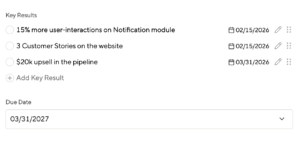
Additionally, Key Results can now we reshuffled and they are always editable, not just when the Objective is edited.
360 Degree Feedback
Performance Reviews
Relaunched Writing Assistant
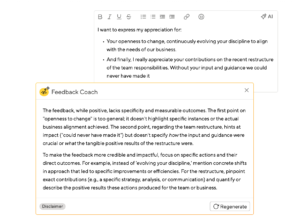
We’ve entirely overhauled the writing assistant for Reviews and 360s, and it’s now also available for self-assessments.
The design is now more lightweight and allows parallel work on the content. In addition to writing suggestions it offers a “coach mode” that guides you towards making feedback more impactful and helpful.
AI
Goals and Objectives
Objectives Coach
Craft SMARTer goals with the help of our latest AI-powered feature, the Objectives Coach. It will prompt your employees to refine their objectives, so that you don’t have to.
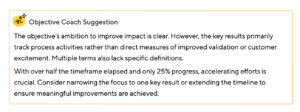
You’ll find the coach on your own current(!) objectives and on the objectives of your team members.
Performance Reviews
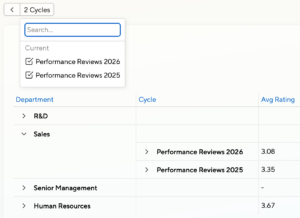
Cross-cycle reporting for Review Cycles
Running multiple cycles in parallel? Curious about a team’s performance trajectory over time? Now you can consolidate the results of several review cycles into one unified report, with advanced filtering and sorting options to help you slice and dice your data according to your needs.
AI
Performance Reviews
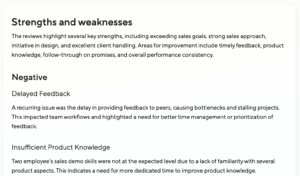
AI Cycle Insights
Get AI insights for your entire review cycle, or for select reviews, like for a department or for a location. Learn more on the feature page.
Goals and Objectives
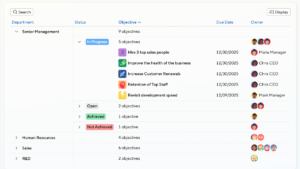
New Objectives Dashboards
You can now see your team’s and your company’s objectives at a glance, and apply powerful filtering and grouping to get the bigger picture quickly.
Performance Reviews
Review Analytics: Powerful Filters and Grouping
Your Review dashboard now boasts powerful filters and grouping. Easily spot patterns and gaps across teams, departments, tenure, or demographics. See where your people shine and where more support is needed.
360 Degree Feedback
Confidential 360 Questions launched
Confidential 360 Questions help teams share honest feedback safely, so you can strike the right balance between transparency and psychological safety. Customize your questionnaire with confidential questions whose answers will be hidden from the employee.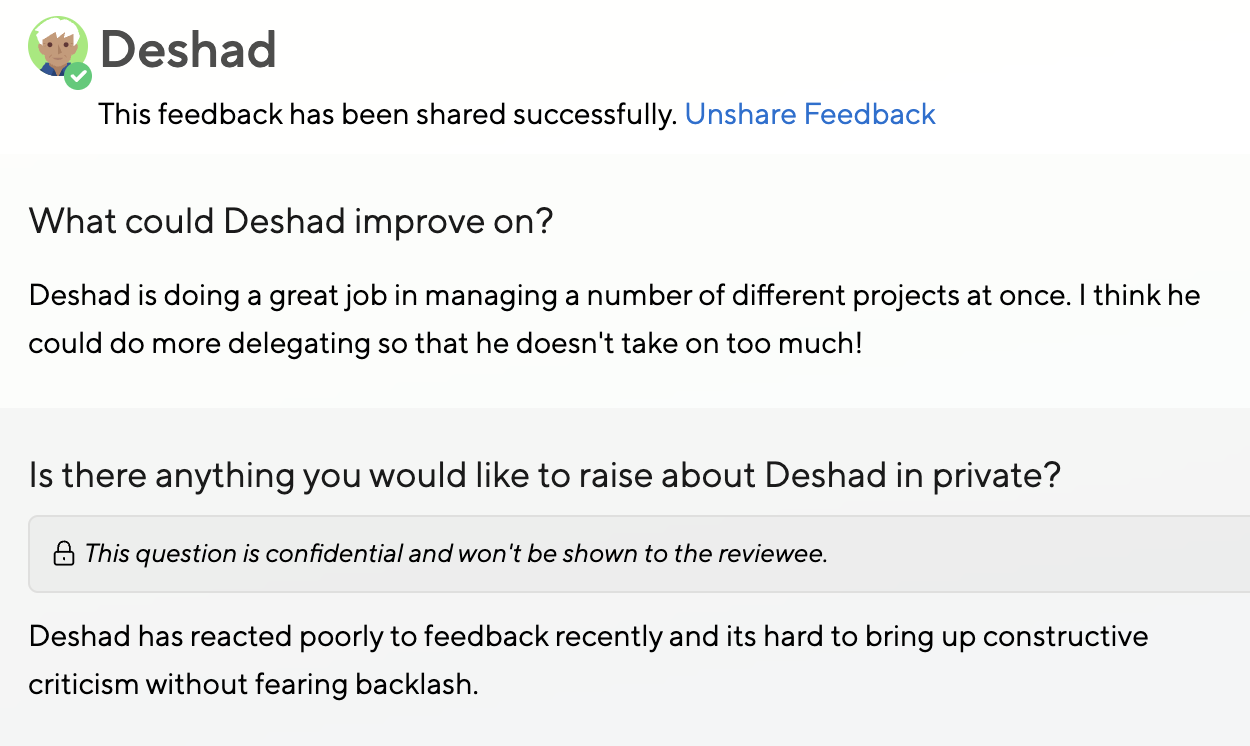
Platform
PDF Exports: Streamlined design, and faster
Your PDF Exports just got a refresh. They have a streamlined design and are faster than ever before.
360 Degree Feedback
Anytime Feedback
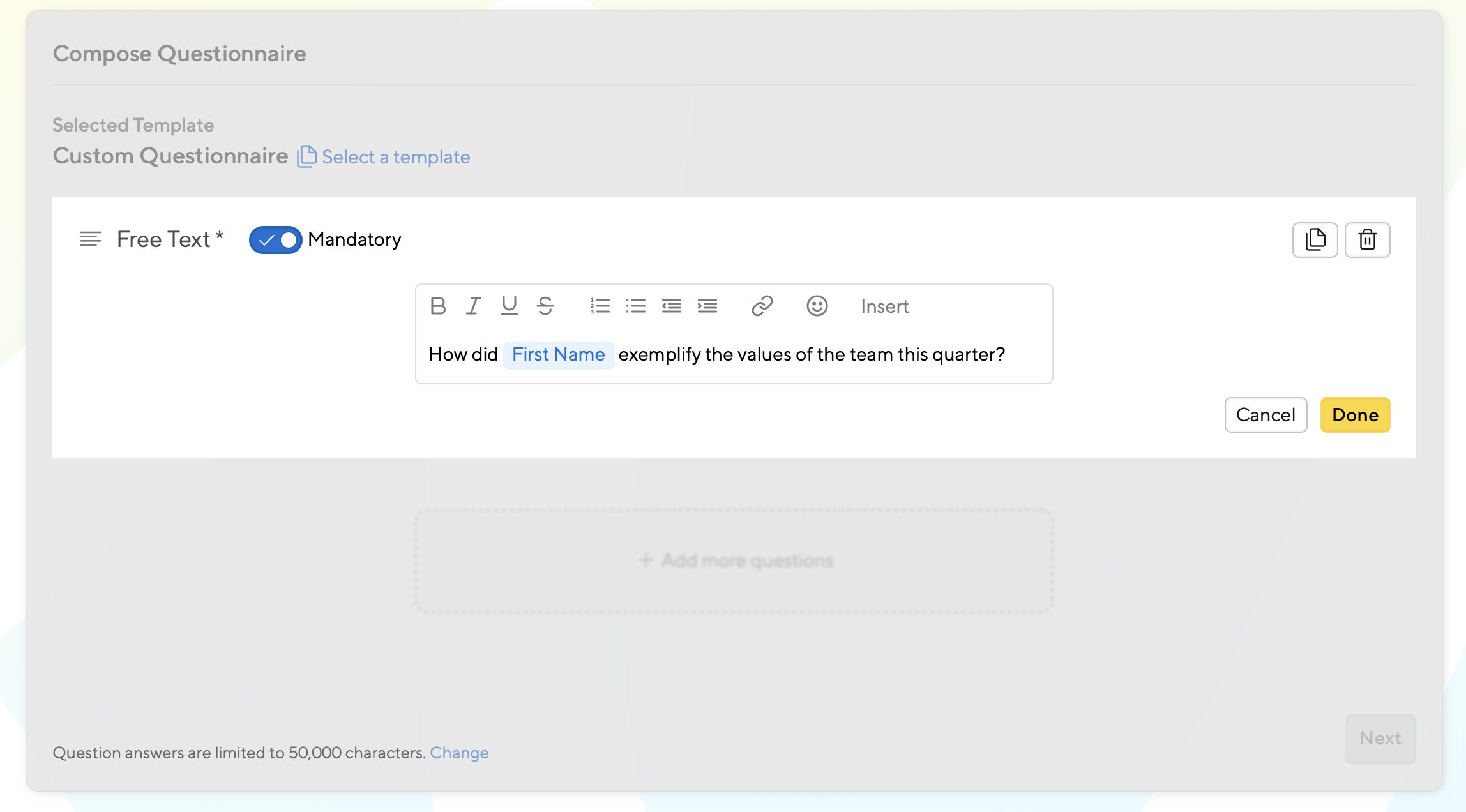
Support for mandatory questions in Anytime Feedback and 360 Reviews
Make sure your employees never skip a question. Questions can now be made mandatory in Anytime Feedback and 360 Reviews.
Platform
Streamlined design and improved navigation.
We’re excited to launch a streamlined design and improved navigation. Together, they will make SI more intuitive and prepare us for future improvements.
1:1 Meetings
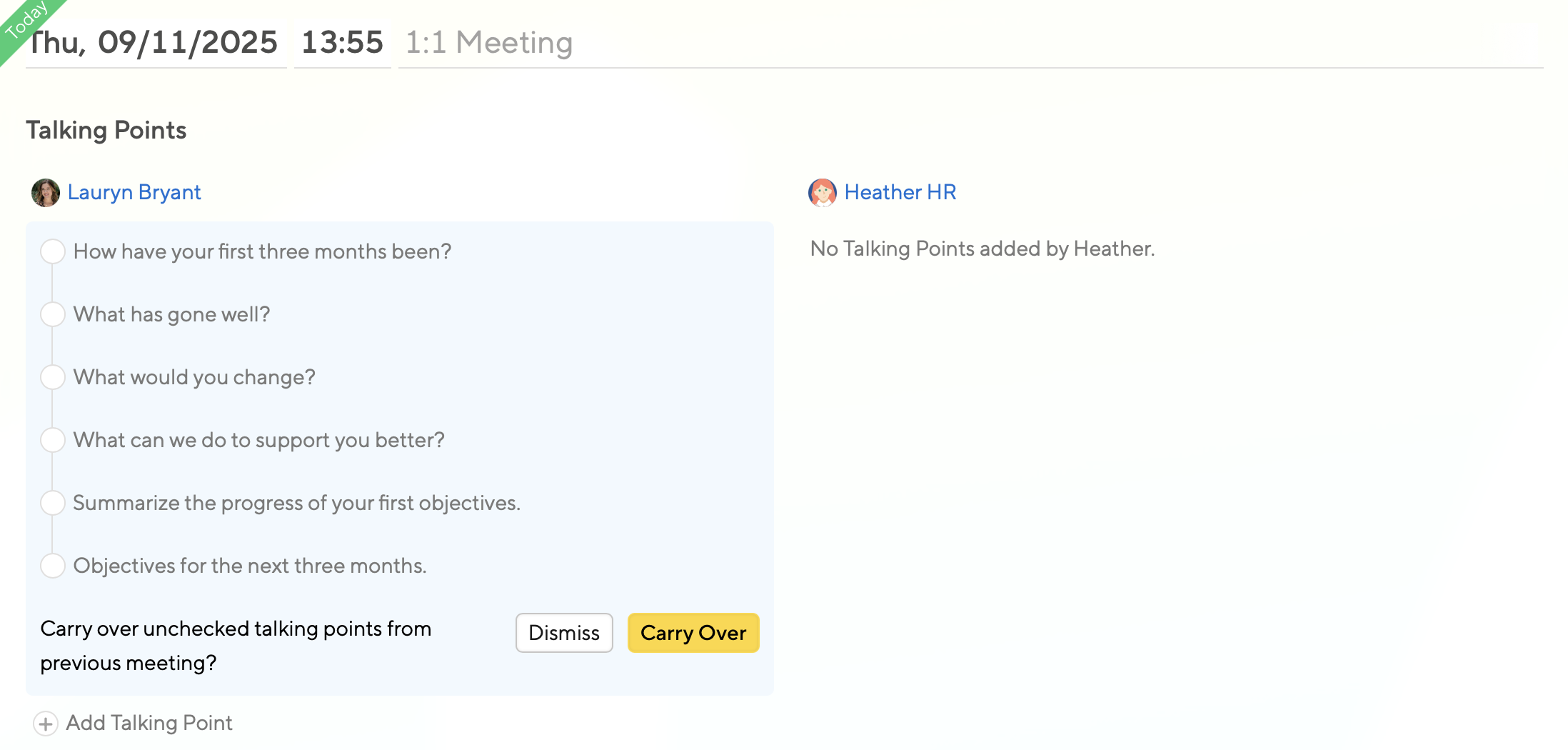
Carry over unchecked talking points
Stay accountable and productive in meetings by carrying over unchecked talking points.
360 Degree Feedback
AI
Goals and Objectives
Turn 360 feedback into an Objective with the power of AI
Become an Action Hero with our newest feature, Feedback-in-Action. Now you can turn 360 feedback into an Objective with the power of AI. This new feature ensures feedback leads to progress, not just reflection.
Platform
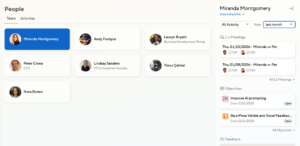
New Team Page
We revised the team page to open the sidebar for quick access to all of an employee’s core data, and also included “dotted” team members to the page.
Goals and Objectives
Cascading Objectives Launch
Cascading Objectives allow you to add Company and Group Objectives to Small Improvements so that everyone can work towards a shared vision. Add transparency and alignment to your organization by setting up a Cascading Objective cycle today.
Anytime Feedback
Automations in Anytime Feedback
Taking a summer vacation and still wanting to drive Feedback Initiatives? No problem. Automating Feedback is now a lot simpler with the merging of two of our favorite features. Find Automations in your Anytime Feedback feature to make your life a little easier.
Goals and Objectives
Cleaner Objective Cycle Timeline
Cycle timelines are a place for you to get useful information, fast. That’s why we made the Objective timeline nice and tidy so that you don’t have to waste time managing dates and deadlines.
Platform
Spring cleanup and clutter removal
A spring clean up is underway with some small tweaks that have a big impact. You will notice a cleaner UX throughout the app that makes it easier than ever to give and receive the feedback you need.
Platform
Design Refresh kickoff
Small updates, big improvements. Our design just got a refresh. You’ll notice a more modern look on the home page and throughout the app.
AI
Platform
AI Control Panel
Control how you want your organization to use AI features with the ability to disable self-service AI features using our new toggle in the Settings panel.
AI
Performance Reviews
AI-generated Summaries in Reviews
AI-generated Summaries allow Managers to view a synopsis of their Performance Reviews to identify key themes and easily follow up with their direct reports.
Platform
Manager Activation Dashboard
The beta version of the Manager Activation dashboard is designed to give Admins more insight into the activity and engagement of their organization’s managers. Easily track and analyze their effectiveness with their teams.
Performance Reviews
Select participants for Review cycles more conveniently
Admins can select participants for new review cycles using filters, which is quicker and more precise than selecting users manually from a list
360 Degree Feedback
Performance Reviews
AI Writing Assistant
Writing feedback just got easier with the help of our AI writing assistant. We designed our AI writing assistant to be a coach so that employees, managers and admin can learn how to create accurate and valuable feedback.
Anytime Feedback
Praise
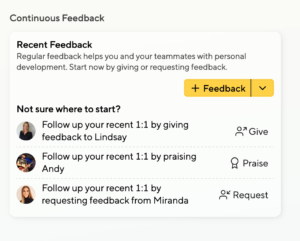
Enhanced Continuous Feedback widget
The Continuous Feedback widget on employee and Admin’s homescreens has been expanded to provide Praise suggestions and usage.
360 Degree Feedback
360 Degree Cycle Types
Streamline your 360 set up by selecting one of three different cycle types when setting up a new 360 cycle: Peer-to-Peer, Upwards Manager, and Full 360. Reviewers are nominated automatically based on the cycle type selected.
Surveys
Four Pulse Surveys available at no cost
It’s now possible to run Pulse Surveys without purchasing the add-on package. You can run four Pulse Surveys per year.
Anytime Feedback
Praise
Launching the Continuous Feedback widget
Our new Continuous Feedback widget feature encourages teams to easily launch feedback requests from their home dashboard using smart prompts.
1:1 Meetings
Anytime Feedback
New Automations trigger for follow-ups after a 1:1 meeting
A new Automations trigger allows you to send follow-ups to managers or team members after a 1:1 meeting has occurred, for example with Anytime Feedback.
1:1 Meetings
New 1:1 meetings Automations
We’ve added in more scheduling options to 1:1 meetings Automations to make it possible for teams to refine when they meet.
360 Degree Feedback
Anytime Feedback
Self-assessments now available in 360s and Anytime Feedback.
Self-assessments are now available in 360s and Anytime Feedback.
Performance Reviews
Automated Reviews via Automations feature
Automated Reviews are now available in our Automations feature. Create cycles that repeat based on a template.
360 Degree Feedback
Anytime Feedback
Quick win: Feedback requesters can nudge reviewers directly
Feedback requesters can now nudge reviewers, speeding up the feedback process.
360 Degree Feedback
Quick Win: Add all managers to review their team members in 360
There is now an option to add all managers to review their reports during Quick 360 Review Cycles.
Surveys
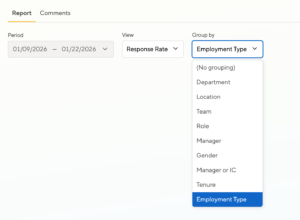
Quick Win: Filter Pulse Surveys by employment type
You can now group Pulse Surveys by employment type so you can learn about challenges part-timers (or full-timers) are facing.
Platform
Automations can now target specific employees
Automations now support specific employees, empowering you to tailor automated actions to smaller groups of people.
Platform
Introducing Automations for HR 🎉
Introducing Automations for HR 🎉 Enable automations to save time and supercharge your workflow. Learn more in our Help Center.
Anytime Feedback
Default visibility for managers: in Anytime Feedback
Default visibility for managers: HR now has the power to set default visibility for managers in Anytime Feedback, giving them greater control over information sharing.
Performance Reviews
Improved communication in calibration reviews
Improved communication in calibration reviews: We will now send an automatic email notification to managers when they can begin sharing in a calibration review.
1:1 Meetings
Enhanced collaboration in 1:1 meetings
Anytime Feedback
Anytime Feedback Insights for Managers
Performance Reviews
Bulk-extend Deadlines in Performance Reviews
Platform
Streamlined directory export
Anytime Feedback
Customize the wording in Anytime Feedback
Praise
Quick Win: Manager notifications for Praise
360 Degree Feedback
Performance Reviews
Mandatory questions for 360 Degree Feedback and Performance Reviews
360 Degree Feedback
Performance Reviews
Introducing customizable templates for Performance Reviews and 360s.
Introducing customizable templates for Performance Reviews and 360s. Create and update templates throughout the year as needed and launch a new cycle when ready.
1:1 Meetings
Schedule reoccurring 1:1 Meetings with Automations update
Schedule reoccurring 1:1 Meetings in-app with our new Automations update. Apply a template to your automation to help save even more time and add structure to your meetings.
1:1 Meetings
Export all 1:1s
Need a record of all your meetings? Export your 1:1s for a history of all talking points, notes, and action items.
Performance Reviews
Introducing Calibration Cycles
Decide which type of cycle you’d like to launch in Reviews by selecting the type when launching your cycle. A calibration review gives you advanced settings and a pre-calibrated rating option.
360 Degree Feedback
Quick Win: Schedule the 360 cycle kickoff email upfront
Set it and forget it! You can now send the 360 cycle kickoff email automatically.
1:1 Meetings
Action items support tags for prioritization
Strategically tackle your action items with new tags for prioritization.
Anytime Feedback
Anytime Feedback now supports self-assessments
You don’t have to wait for a Performance Review to self-reflect. Anytime Feedback now supports self-assessments.
1:1 Meetings
Bulk update visibility settings for all your past 1:1 meetings
Need to update the visibility settings for all your past 1:1 meetings with someone? We’ve added a button that allows you to share them all at once. Learn more!
Anytime Feedback
Two new question types for Anytime Feedback
Level up your feedback with two new question types for Anytime Feedback.
Platform
Streamlined navigation experience for HR Admins
We’ve upgraded and streamlined the navigation experience for HR Admins. Learn more about what changed.
Anytime Feedback
Customize Anytime Feedback Emails
Customize Anytime Feedback emails under the email settings page, allowing you to easily tailor these notifications to fit your team’s needs.
1:1 Meetings
Individually-driven 1:1 Meeting templates are here
Individually-driven 1:1 Meeting templates are here! Now, anyone can create a template that will quickly generate the talking points they use the most. Learn more.
Anytime Feedback
Improved Anytime Feedback Dashboard
Our new Anytime Feedback dashboard includes completion and participation statistics, as well as new filtering options. Check it out.
Performance Reviews
Automate reminders in Performance Review cycles
Take some work off your plate and automate reminders in Performance Review cycles! Learn more.
Anytime Feedback
New: Anytime Feedback feature
Asking for and receiving feedback just became more effortless than ever. Our new Anytime Feedback feature encompasses requesting feedback and giving feedback into one easy, straightforward action. Learn more.
Performance Reviews
Extend individual deadlines in a review cycle
You asked, we answered. Now you can extend individual deadlines in a review cycle. Learn how!
Platform
Improved user import, including Workday integration
We’ve made it easier to import and synchronize employee data. Our new integrations screen allows you to easily integrate with Workday or set up a custom user import.
Platform
New hidden profile fields to track employment status and terminations
Better understand your workforce by using our new hidden profile fields to track employment status and terminations. Learn more.
360 Degree Feedback
Goals and Objectives
Performance Reviews
Improved Timeline sections in Reviews, 360s, and Objectives
The Timeline sections in reviews, 360s, and objectives have a new look for summer. This includes updates to the review calibration process. Check it out!
Platform
Quick Win: Managers will receive a notification for new team members
Stay on top of management changes in Small Improvements. Managers will now receive a notification when someone assigns them a new report.
1:1 Meetings
New time filters for 1:1 Meetings
New time filters for 1:1 Meetings allow pages to load more quickly and efficiently.
Platform
New role: “Secondary Manager”
We’ve created a new role called “Secondary Manager”. HR Admins can now grant Secondary Managers visibility into 360° Feedback, Objectives, and Performance Reviews. Learn more in our help center.
Platform
New: Custom Wording
Tailor Small Improvements to your organization’s culture and needs with Custom Wording. Now you can easily update feature names and other language used throughout the tool.
360 Degree Feedback
Managers can manually release 360 feedback before the cycle ends
Excited to share 360 feedback with your employees? Managers can now manually release feedback before the cycle deadline. Learn more!
Platform
New: Log in with Google
Now any user can sign in with Google to login to their Small Improvements account from our login page, making it easier to access your account on the fly.
1:1 Meetings
1:1 Meetings: Share with anyone in your company
Looking to share meetings with people other than your manager? We’ve updated 1:1 Meetings so you can share them with anyone in your company under the visibility settings in your meeting. Click here to learn more.
Surveys
Quick Win: HR Assistants too can launch Pulse Surveys
Starting today, HR Assistants can launch new Pulse Surveys and view results for surveys that they have created.
1:1 Meetings
Easier Scheduling of Future 1:1 Meetings
We’ve made it easier to schedule future 1:1 Meetings. You can now select a date and time on the creation screen for a new 1:1.
Platform
Direct export of all employee data
Looking to export all of the feedback, performance reviews, and objectives for a specific employee? There is now a button on the employee profile page that allows you to do just that! Learn more.
Performance Reviews
Improved support for confidential questions in Reviews
Now all question types can be made into confidential questions. This makes it easier for managers to leave confidential feedback in linear, multiple-choice, checkbox, or drop-down answers.
Surveys
Improved drafts for Pulse Surveys
Need to make changes to a pulse survey before it goes out? Now you can edit and update existing surveys before they go out to employees.
1:1 Meetings
1:1: Employees notified 24 hours before upcoming meetings
We’ve tweaked the timing on Slack notifications for 1:1s. Employees are now notified 24 hours before an upcoming meeting.
1:1 Meetings
1:1 Dashboard: Improved Filtering for empy meetings
Get more out of the 1:1 Meetings dashboard with a new filter for meetings with no added content. Analyze how often empty meetings are occurring or exclude them from your results completely.
1:1 Meetings
Introducing Action Items to 1:1 Meetings
HR Admins can enable Action Items on the meeting settings page. Instead of writing your to-dos notes on a post-it, create Action Items right in your meeting.
Surveys
Share Pulse Survey Results with your Team
Looking to share Pulse Survey results with your team? You can now share results with any user regardless of admin permissions. Results and comments will be available to viewers. Read more in our Help Center.
Surveys
Set Deadlines and Reminders for monthly Pulse Surveys
Get answers when you need them by setting a deadline for monthly Pulse Surveys. This reminds your employees to submit in time their answers, so you can analyze responses and make adjustments before the next Survey.
1:1 Meetings
Define global default visibility for content in 1:1 Meetings
As an HR admin, you can now set global visibility for content in 1:1 Meetings. As an employee, adjust these settings and decide who can see them.
Surveys
Automated reminder notifications for Pulse Surveys
Send automated reminder emails and/or Slack notifications for Pulse Surveys. Nudge your employees to complete a weekly, monthly, or quarterly Survey before the due date.