We’ve redesigned the objectives experience in Small Improvements: Creation, editing, commenting and browsing of objectives has improved drastically, and there’s a proper activity log now for each objective too. The core properties of objectives are of course not being altered, all the data is there just like before. You can learn more about the changes here.
The new user interface is being rolled out gradually. Everyone who signed up after August 1 is already using the improved interface, and starting today everyone else can manually enable the new interface for their company account. On October 17th all remaining company accounts will get switched over automatically.
Want to take a look without switching the entire company?
Just follow this link: https://www.small-improvements.com/app/#/objective-browser
If you’re using a subdomain, please copy/paste the URL, and replace “www” with your subdomain.
Want to enable the new screens for the entire company?
Simply go to the Feature Selection menu within the Administration overview and select the option to display the new Objectives user interface. Save the changes and it is live for the whole company!
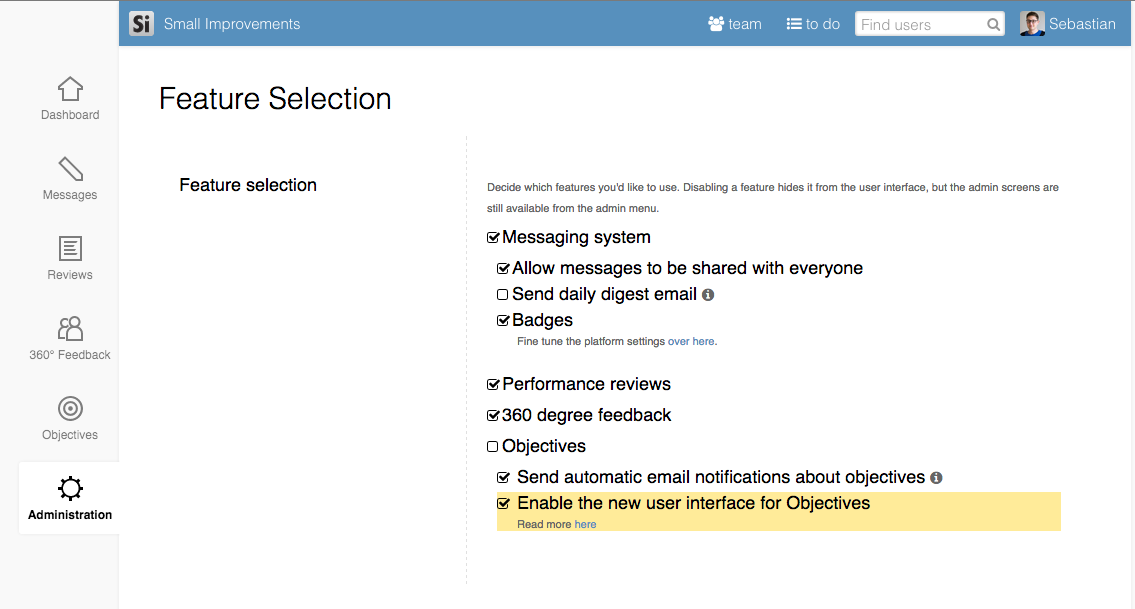
On October 31st all remaining company accounts will get switched over to the new design. The improvements are substantial, but the training effort is pretty minimal. Still, if you’d like to keep the old design for another week or two beyond the 31st, that’s also possible. Navigate to the Feature selection screen, and disable the new interface.
We’d love to hear your feedback!
Please let us know your thoughts after you’ve had some time to use the new interface.